ZipaTile - Registration
ZIPATO ZIPATILE QUICK GUIDE
- Setup mobile application
- Download Zipato Home application (black Zipato icon) from Google Play store or Apple Store on your mobile device
https://apps.apple.com/us/app/zipato/id1297937720
https://play.google.com/store/apps/details?id=com.zipato.smarthome&hl=en_US
- Register an account using the Zipato Home application
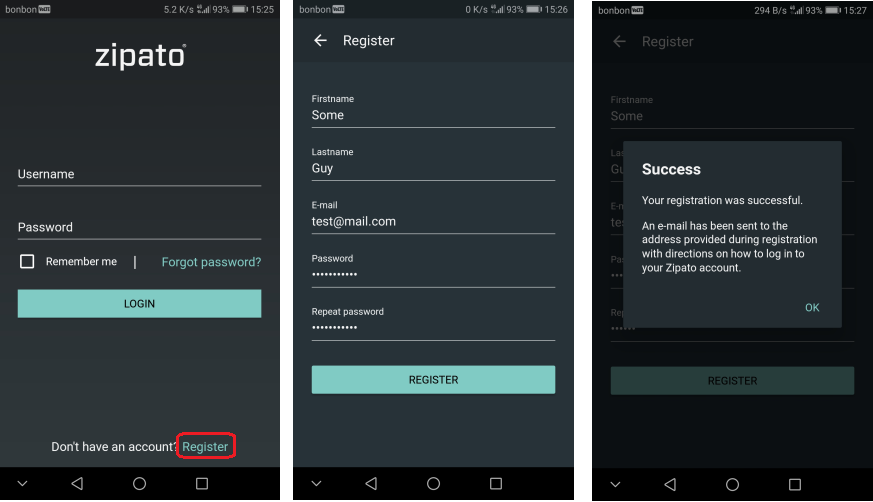
- Verify your email address
- Login with the credentials
-
Setup ZipaTile device
-
Plugin the charger into your ZipaTile device, turn it on
- Connect it to internet (WiFi or ethernet)
- Open in applications, application “App repo” and update your ZipaTile device applications
3.Register your ZipaTile device using the mobile phone application
- Using the Zipato Home application on your mobile device create a system, enter the system in your “My system list”
- Go to the main menu open “Devices”, click on “+” button and select server, enter the serial number of your ZipaTile you want to register (written on the label of the device and box) or do a LOCAL SCAN (you have to be in the same network as the ZipaTile device) and select the serial
- Press REGISTER
- Go to main menu and press “Sync” button, ZipaTile device should automatically login if it’s connected to the internet