Rule Example - Home Away Detector
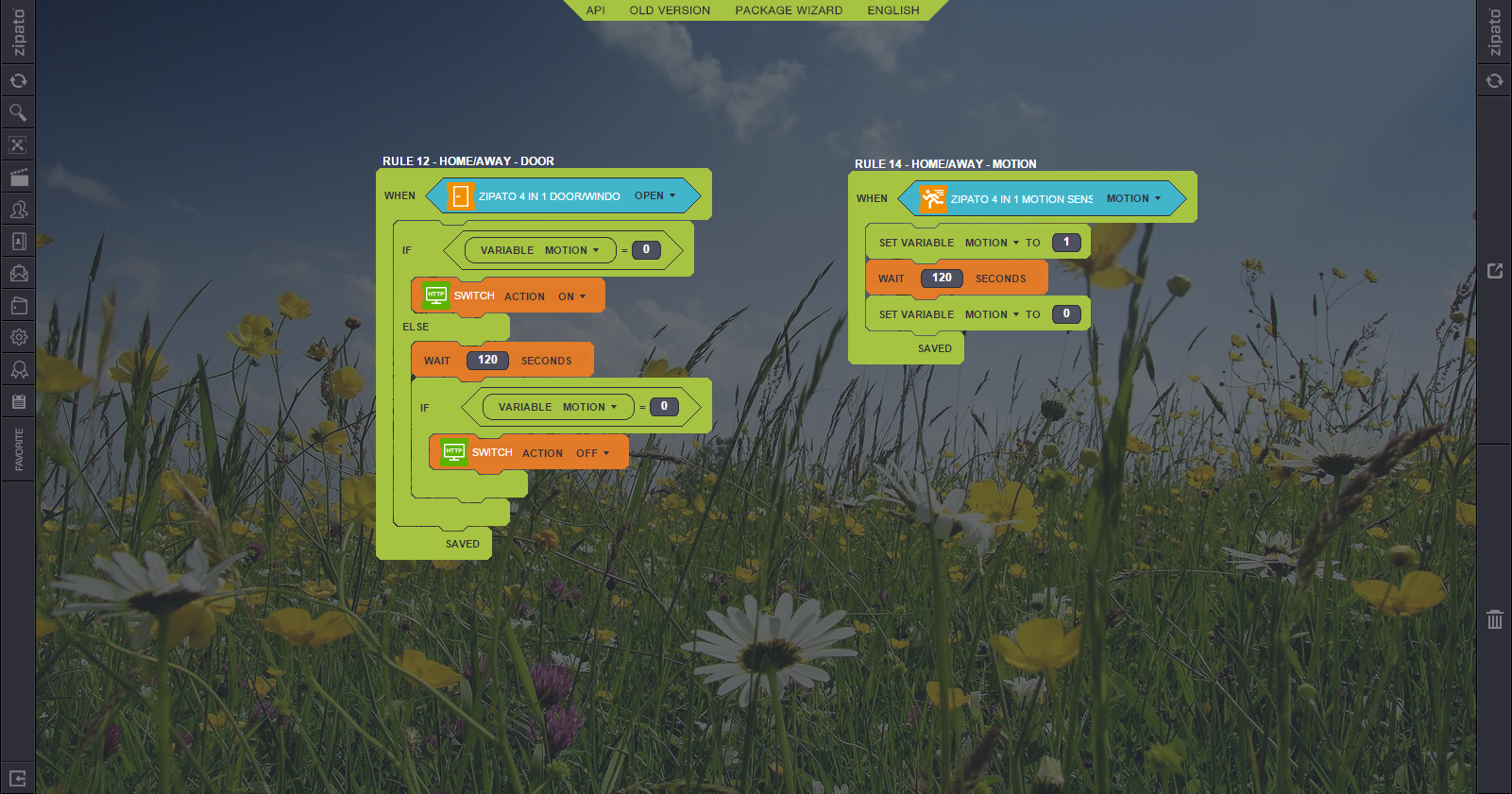
This application note shows how to create a home/away detector that automatically turns on or off a virtual switch.
Project Aim
The aim of this project is to automatically control a virtual switch:
- Virtual switch turns on or off when someone enters or leaves the house.
Components
For this project we have used a Z-Wave system comprising of:
- Zipato Multisensor Quad – used to detect the state of the door and motion inside the room.
- Zipato Controller
Setup and Control
The Zipato Multisensor Quad was ‘Included’ into the Z-Wave network by ‘Adding’ it to the Zipato Controller, further information is available in "Adding new devices on the Zipato Controller" section.
To store the home or away status, a virtual switch was created, further information is available in the "Virtual Switch - Adding" section.
Then we created the following rules in the Zipato Rules Creator to control how the Home/Away detector would work. For more details see the "Introduction of Rules Creator" section.
These rules work as follows:
Door rule
- Main 'When' block wraps the whole rule. The rule is activated when Zipato Multisensor Quad door detector is set to open.
- The 'If Else' condition test the 'Motion' variable (0 = no motion, 1 = motion).
- The 'Action' block turns on the virtual switch, someone is home.
- The 'Wait' block pause the rule for 120 minutes.
- The 'If' condition test the 'Motion' variable (0 = no motion, 1 = motion).
- The 'Action' block turns off the virtual switch, someone just left home.
- Don't forget to 'Save' your rule and then to 'Synchronize' it at the end.
Motion rule
- Main 'When' block wraps the whole rule. The rule is activated when Zipato Multisensor Quad motion detector is set to motion.
- The 'Set variable' block set the variable 'Motion' to 1 (motion detected).
- The 'Wait' block pause the rule for 120 minutes.
- The 'Set variable' block set the variable 'Motion' to 0 (no motion detected).
- Don't forget to 'Save' your rule and then to 'Synchronize' it at the end.
More on: See here Rule Example description
Tutorial: